Cyber security checklist for GP practices
A checklist to work through with your IT provider, so you know which cyber security basics are in place and who is fixing the rest. Every check names the official guidance it comes from, from the Australian Cyber Security Centre or the RACGP.
What's inside
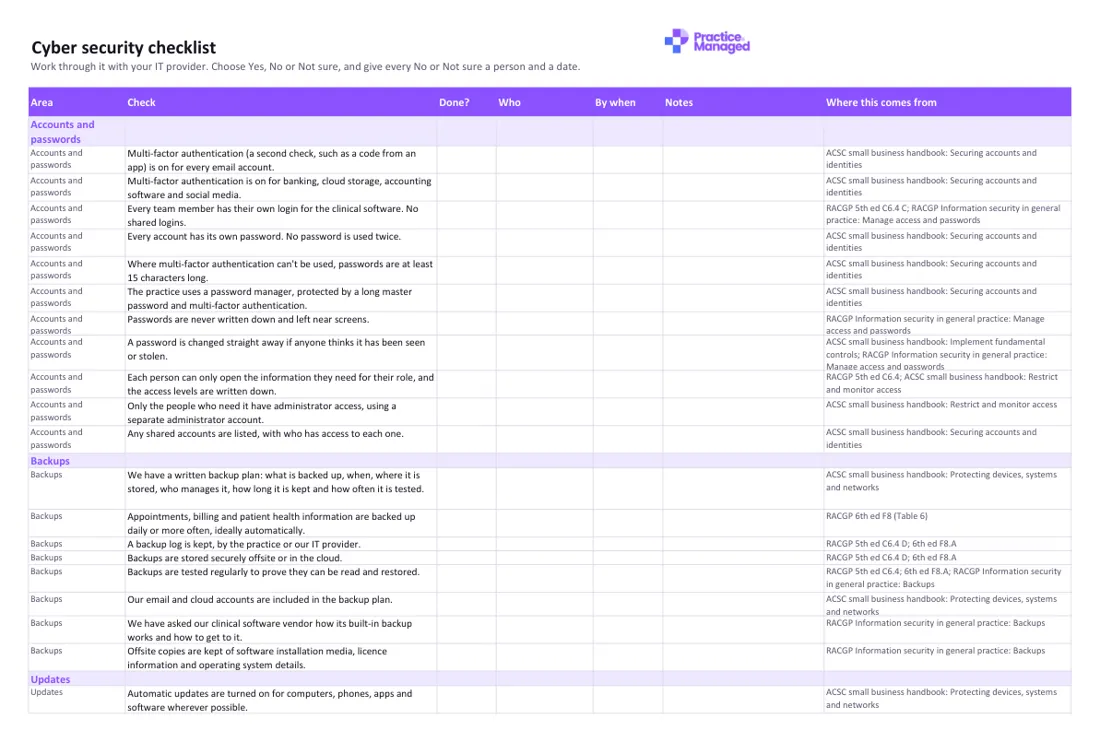
- Checklist: 55 checks in seven groups: accounts and passwords, backups, updates, email and phishing, devices, staff joining and leaving, and what to do in an incident.
- Your columns: Done? (Yes, No or Not sure, coloured green, red or amber), who, by when and notes.
- Where this comes from: the ACSC or RACGP guidance behind each check, with the links on the Sources tab.
- Who to call: your IT provider, software vendor and bank, the Australian Cyber Security Hotline (1300 CYBER1), ReportCyber and the OAIC, ready to print.
- How to use it: where to start, and what the RACGP Standards ask for.
Who fills it in, and when
The practice manager, or the team member responsible for computer security, works through it with the practice's IT provider. Many checks are technical, so the IT provider can usually give the answer. Do it once to find the gaps, then again after any big change, such as a new IT provider, new software or a cyber incident. The bottom of the checklist has a place to record the date checked and when the next check is due.
How to use it
- Book an hour with your IT provider and go through the checklist together.
- Choose Yes, No or Not sure for each check, and give every No and Not sure a person and a date.
- Fill in your own numbers on the Who to call tab, print it and keep it where you can find it if the computers are down.
Cyber security checklist
Excel · 50 KB · free
Which RACGP Standards it helps with
Supports 5th edition criterion C6.4 (Information security), which asks for a team member responsible for computer security, unique logins to the clinical software, a business continuity and information recovery plan, a backup log, offsite backups, and up-to-date antivirus and firewalls. Also supports 6th edition criterion F8 (Information security), which adds a tested cyber security incident response plan and a way to tell patients if a data breach affects them.
- 5th edition: C6.4 Information security
- 6th edition: F8 Information security
An example
Example only: Backups, Backups are tested regularly to prove they can be read and restored. Done?: Not sure. Who: our IT provider. By when: 15 December. Notes: the IT provider will restore last Friday's backup to a test computer and show us the result.
Common mistakes to avoid
- Ticking Yes for backups because they run every night, without ever restoring one. The RACGP notes backup failures are often found only when you need the backup.
- Turning on multi-factor authentication for some accounts but not email, when the ACSC says to start with email.
- Forgetting to turn off accounts and remote access when someone leaves, and to change the passwords of any accounts they shared.
Goes well with
It goes with our guide Cyber security basics for a GP practice: a plain-words guide.
Want to know where the rest of your practice stands? Take the free readiness check: ten yes-or-no questions, your score straight away, and a to-do list sent to your inbox.