Practice policy register template
One spreadsheet that lists every policy in your practice, who owns it, when it was last reviewed and when it is due again. It comes with the usual GP practice policies already listed, grouped by priority, so you start with a full list instead of a blank page.
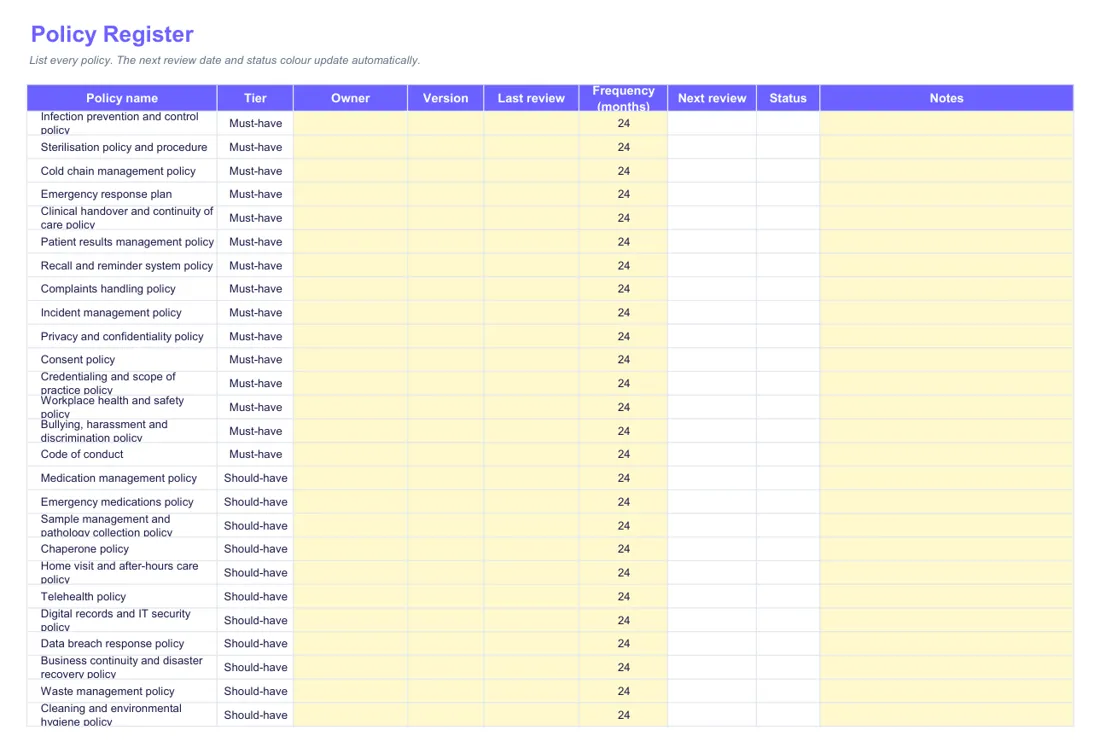
What's inside
- Policy register: one row per policy, with owner, version, last review and how often it is reviewed. The next review date works itself out.
- Status colours: green when the review is more than 3 months away, amber within 3 months, red when it is overdue.
- Attestations: a tab to record which staff have read and acknowledged which version of each policy.
- Review log: a tab to note what changed at each review.
Who fills it in, and when
The practice manager usually keeps the register, and each policy has a named owner who looks after its review. Set it up once with every policy you hold, then book each review before it falls due. Each review is set to every 24 months, and you can choose 12 or 36 months instead.
How to use it
- List every policy your practice has, or keep the ones already there.
- Give each one a named owner (a person, not a role) and a review date.
- Check the colours once a month and book in anything turning amber.
Practice policy register
Excel · 49 KB · free
Which RACGP Standards it helps with
Supports 6th edition criterion F1 (Defining and planning for the practice), which asks practices to review all policies, procedures and operational documents at least every two years and to keep version control. The 5th edition has no single matching criterion: the RACGP mapping points to various policy review requirements.
- 6th edition: F1 Defining and planning for the practice
An example
Example row (made-up): Cold chain management policy. Tier: Must-have. Owner: Mary Smith, practice nurse. Version: 3. Last review: 1 March 2025. Frequency: 24 months. The next review date fills itself in as 1 March 2027, and the status turns Amber three months before that.
Common mistakes to avoid
- Naming a role as the owner, when the file asks for a named person, not a role.
- Changing a policy without noting it, when the Review Log tab is there to record what changed at each review.
- Updating a policy without recording who has read the new version, which is what the Attestations tab is for.
Goes well with
It goes with our guide Practice policies and procedures: what every Australian GP clinic needs.
Want to know where the rest of your practice stands? Take the free readiness check: ten yes-or-no questions, your score straight away, and a to-do list sent to your inbox.