Yearly compliance calendar
The recurring jobs that have a time set by an official source, each with how often and where it comes from. Tick each month when it's done.
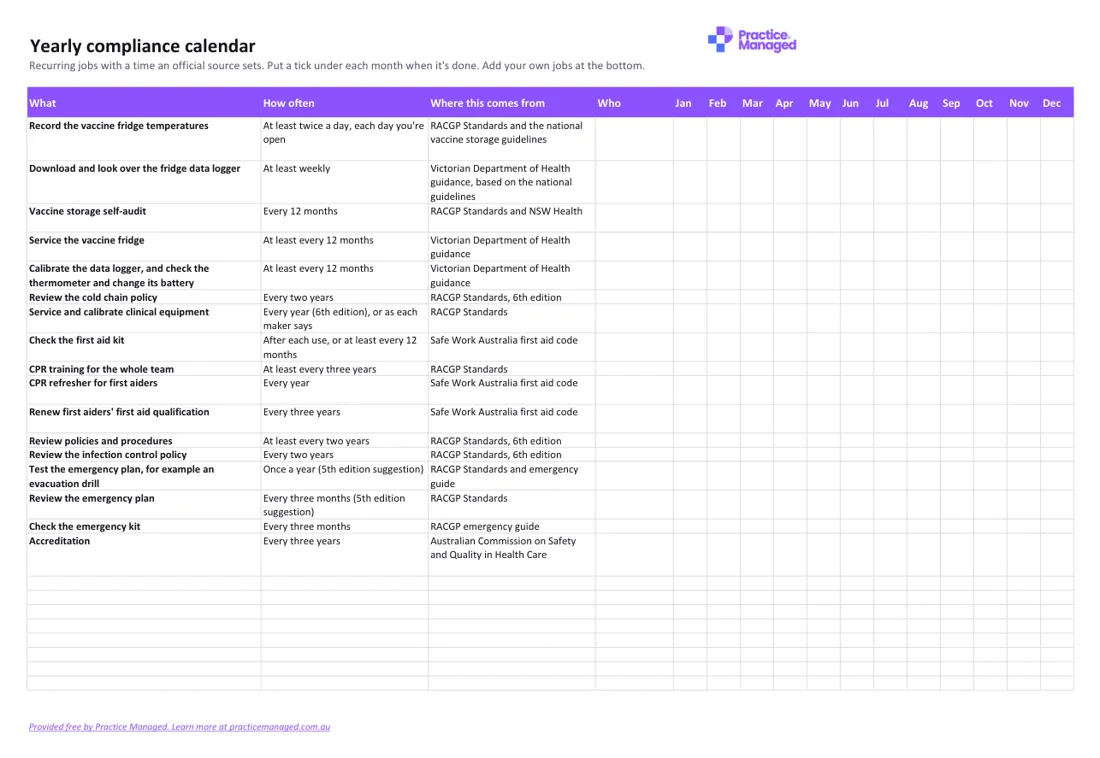
What's inside
- 17 recurring jobs, from vaccine fridge checks and equipment servicing to CPR, policy reviews and testing the emergency plan.
- How often each one is due, and where that comes from.
- A second tab for jobs with no official time, so you can set your own.
Who fills it in, and when
The practice manager usually sets it up and adds who is responsible for each job. Each month, look down that month's column and tick each job when it's done. Daily and weekly jobs, like fridge temperatures, are kept in their own logs; tick the month when that log is complete. Add your own jobs at the bottom of the calendar.
How to use it
- Add who is responsible for each job.
- Tick each month when the job is done.
- Add your own jobs at the bottom.
Yearly compliance calendar
Excel · 45 KB · free
Which RACGP Standards it helps with
It gathers times from several criteria rather than one, including 5th edition GP6.1 and 6th edition CG12 (Maintaining vaccine potency), 5th edition GP5.2 and 6th edition CG11 (Practice equipment), and 5th edition C3.3 (Emergency response plan). CPR every three years comes from 5th edition C8.1 and 6th edition F4. The file notes accreditation currently uses the 5th edition; the times marked 6th edition come from the newer edition, which practices are encouraged to start using.
- 5th edition: GP6.1 Maintaining vaccine potency
- 6th edition: CG12 Maintaining vaccine potency
- 5th edition: GP5.2 Practice equipment
- 6th edition: CG11 Practice equipment
- 5th edition: C3.3 Emergency response plan
- 5th edition: C8.1 Education and training of non-clinical staff
- 6th edition: F4 Induction, training and supporting performance
An example
Example only: Check the emergency kit, every three months, from the RACGP emergency guide, who: Jo Citizen. Ticks in March, June, September and December. For a daily job, such as recording the fridge temperatures, tick each month once that month's temperature log is full.
Common mistakes to avoid
- Sticking to the calendar when a maker's instructions or your state's rules ask for something more often: follow those instead.
- Ticking a month for a daily job before its log is complete.
- Ignoring the Set your own times tab, which holds jobs like test and tag and the infection control audit.
Goes well with
It goes with our guide New practice manager checklist: your first 90 days in a GP practice.
Want to know where the rest of your practice stands? Take the free readiness check: ten yes-or-no questions, your score straight away, and a to-do list sent to your inbox.